Usage Overview
The Usage Overview section shows API usage and capacity information for the current workspace.
Use this section to check API limits, monitor active API keys, and understand how much API-created data has been added to the workspace.
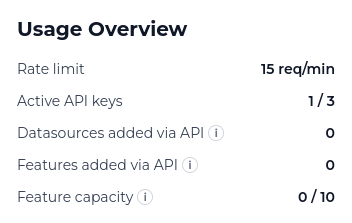
Usage information
| Field | Description |
|---|---|
| Rate limit | The maximum number of API requests the workspace can make per minute. If this limit is exceeded, requests may be temporarily rejected until the limit resets. |
| Active API keys | The number of active API keys currently available in the workspace, shown against the workspace limit. |
| Datasources added via API | The number of datasources created through RI Connect API keys. Datasources created through the platform UI are not counted here. |
| Features added via API | The number of features created through RI Connect API keys. Features created through the platform UI are not counted here. |
| Feature capacity | The workspace-wide feature limit. This is the same limit used by Pipeline Credits and includes features added from both the UI and the API. |
Why this matters
Monitoring usage helps you understand how RI Connect is being used across your workspace.
It can help you:
- Check whether your workspace is approaching its API key limit.
- Confirm how many datasources or features have been created through API workflows.
- Monitor the workspace feature capacity.
- Understand whether automated integrations may be approaching usage limits.
Note:
Usage values are workspace-specific. If you switch workspace, the usage overview will show values for the selected workspace.